As the Lead UX on our Common Component Library (CCL), I used to lean heavily on engineering resources to bring designs to life in Storybook. But recently, those resources weren't available. I had one Senior Developer available as a mentor, but the actual coding workload fell entirely on me.
I had a choice: Let the CCL roadmap stall, or figure out how to build production-grade Angular components myself.
The Challenge
It wasn't just about "getting it to work." The CCL is a federated library used by multiple teams. It requires strict adherence to Accessibility (WCAG), rigorous Unit Testing, and passing enterprise-grade static analysis (SonarQube).
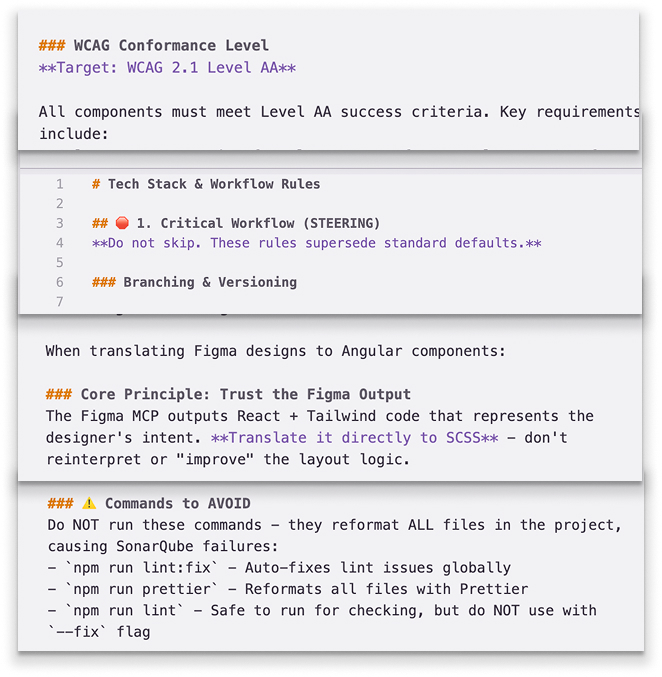
The Solution: Steering, Not Chatting
I started by testing AI workflows (Cursor, Google Antigravity) on personal portfolio projects to build confidence. Once I was ready, I requested a corporate Kiro license and paired it with a Spec-Driven Workflow under my mentor's guidance:
- Steering Documents: I created persistent context files that act as a "Constitution" for the codebase. This ensures the AI follows our Senior Dev's exact SOPs, standardizing the code even though I’m not a career engineer.
- Figma MCP Integration: I fed design context directly from Figma to the IDE, skipping the translation errors between design and code.
- Task Specs (AI-Drafted & Refined): I didn't write specs from scratch. I pasted Jira requirements into Kiro to draft the technical plan, then refined it through dialogue—acting as the architect—and even cross-checked the approach with our internal Copilot for a "second opinion" before any code was written.
The Results (ROI)
Looking at my metrics across all 12+ tickets from the last month, the pattern is consistent.
Whether it was building a complex Table Component (2.5 hrs with AI vs 24 hrs manual), handling tricky Scheduler Logic (1.5 hrs with AI vs 16 hrs manual), or managing a full Angular 20 Upgrade (5 hrs with AI vs 20 hrs manual), the efficiency gains are undeniable.
- Cumulative Impact: In just over a month, we’ve tracked over $16,000 in cost avoidance.
- Consistency: We are seeing a steady ~80% reduction in engineering time per ticket compared to manual estimates.
- Quality: We are consistently passing SonarQube quality gates (0% security hotspots, 'A' reliability) on the first major push.
AI didn't just help me write code; it bridged the gap between my design intent and engineering reality, turning a resource gap into a delivery surplus.
I’m curious—are other designers using AI to cross the boundary into production engineering?