Yesterday was a big day. I finally got to present the culmination of a massive UX architecture project to our development team at AssetWorks.
If I have learned one thing in my five years here, it is that using Figma to hand off designs to developers is not the most efficient way to go. Files get too big, pixel-perfecting everything is a time sink, and developers are forced to constantly context-switch out of their environment to interpret static frames.
To solve this, I have been building isolated, fully functional Angular UI sandboxes that live on their own branches. The goal is to provide clean, accessible, front-end presentational components wired to mock data, so our developers can simply copy the finished front end and focus entirely on wiring up the complex business logic.
The Presentation and The Data 🎤
Yesterday, I walked the dev team through the entire workflow, from finding the UX ticket in Jira to watching my asynchronous video walkthroughs.
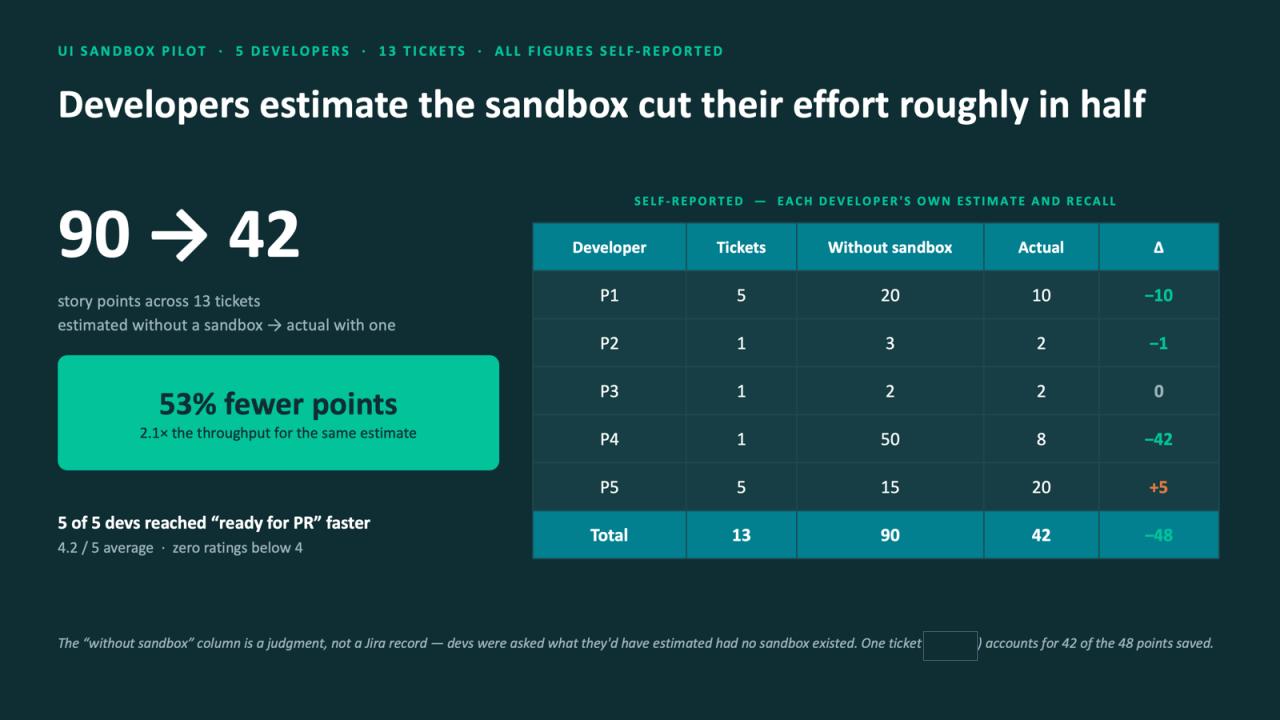
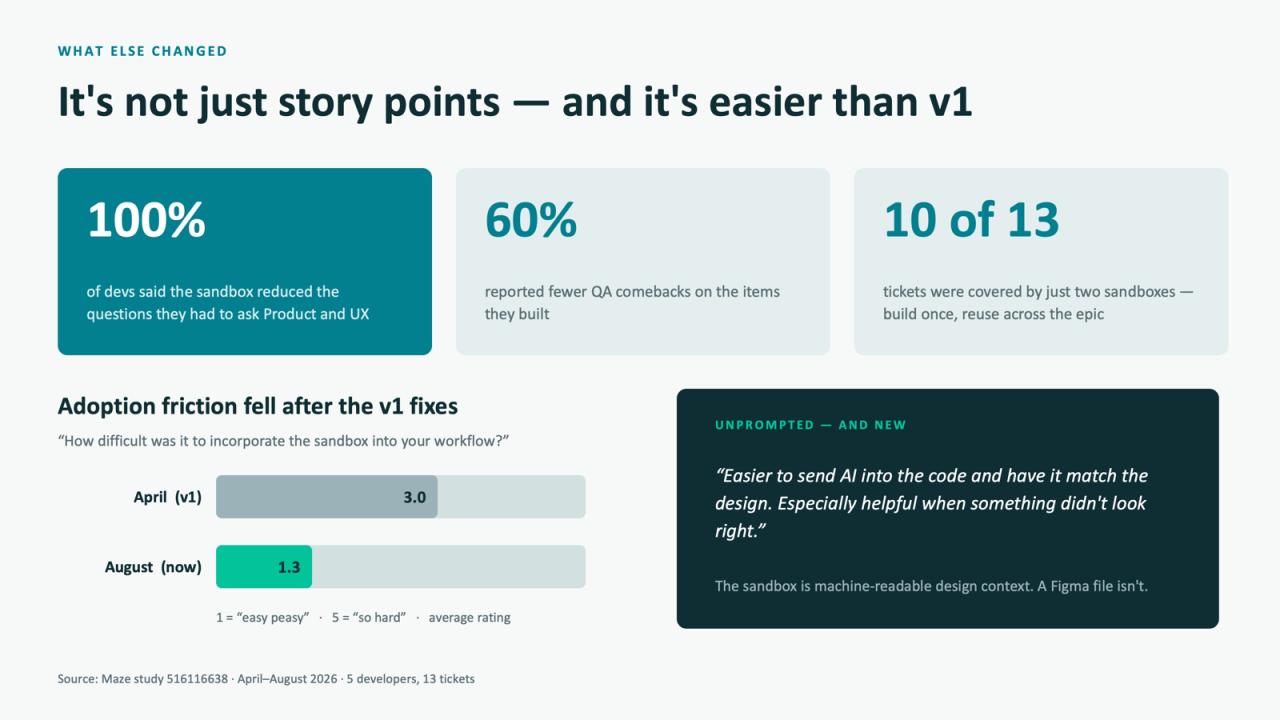
The most exciting part was sharing the data from our recent pilot program. The developers who tested the sandboxes estimated that it cut their effort roughly in half. Across 13 tickets, the estimated story points dropped from 90 to 42, giving them 2.1x the throughput. Furthermore, 100% of them said it reduced the questions they had to ask me or the Product team, and reduced their QA comebacks.
My favorite piece of feedback from the pilot was an unprompted comment from a developer who noted that it is much easier to send AI into the code and have it match the design because the sandbox is actually machine-readable context, whereas a Figma file is not.
The Developer Silence 🤐
Then came the moment of truth. I wrapped up the presentation, smiled, and asked the call, "Does anyone have any questions?"
Absolute, pin-drop silence. 🦗
One developer unmuted to ask if I had a step-by-step guide or FAQ available (which I thankfully had already built out in Confluence!), but beyond that, there were no questions from the field.
As my colleague Ken chimed in to say, "silence is golden".
If you have ever presented a fundamental workflow shift to a room full of brilliant, deeply technical software engineers, you know exactly what I am talking about. It is incredibly easy to let that silence trigger your imposter syndrome. But developers usually don't react with immediate, bouncing enthusiasm. They are processors. They need time to sit with the information, analyze the logic, and mentally poke holes in the system before they start asking questions.
I am incredibly proud of this UI sandbox workflow and so grateful to work at a company that allows for this kind of cross-discipline innovation. Now, I am just waiting for the devs to get their hands dirty in the code. I know the questions are coming—and I can't wait to iterate on the answers together!
#UXDesign #Frontend #AssetWorks #UIArchitecture #Angular #TechPresentations #DeveloperCulture #Workflow